So new, so cool! (Almost) everything you need to know about the new Apple iPhone 4!
Tuesday, June 8th, 2010The iPhone 4 was announced today during Steve Jobs’ keynote at WWDC and the world is taken by storm again.
Its flagship features are, of course, the extremely high resolution screen, video chat capability with FaceTime, and the sexy new form factor. But there’s more to the 4 than that, and even those seemingly self-explanatory new features deserve a closer look. Let’s see just what Apple’s done here with its biggest update to the iPhone since the original.
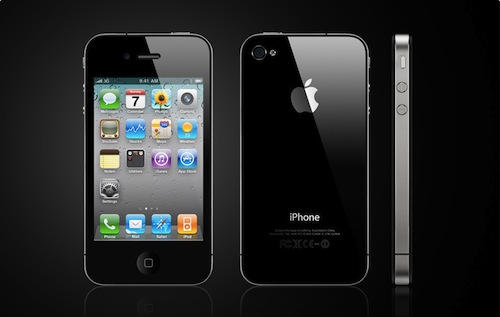 We’re all pretty familiar with the new body, since it was really the focus of Gizmodo’s exposé. In fact, that was pretty much the limit, since they couldn’t do much else with a dead, locked phone. But they examined it very closely and found it to be beautiful and metallic. Its new squared-off look is a signal from Apple that this is an entirely new phone, not just an iteration of the original. You might say this is the true sequel to the iPhone, the 3G and 3GS being merely refinements of the original design. Three years is a long time to stick with what was essentially the same design, especially for a company as chameleonic as Apple. A change was due, and the change is welcome.
The new design is more squared off, with a flatter back, creating a stronger shape in both your hand and eye. It’s not trying to hide the buttons, but rather showing off their careful placement and clean lines. I think the overarching themes here are power and superiority, rather than slickness. The glass on both sides, we found out in the closing video, is “almost as strong as sapphire crystal” and can deform pretty seriously without breaking. Good news to those of us afraid of exploding iPhones.
The previously reported dimensions are accurate: 4.5×2.31×0.37 inches. It weighs 137 grams, more than expected and slightly heavier than the 3GS. It’s similar enough in size and weight to the old one that you probably won’t notice the difference, but the new flat back and squared-off edges will either delight or bother you. I’m guessing delight.
The announcement that the steel rim of the phone is in fact the phone’s antenna nullifies concerns people had about potential signal blocking, like we have seen in several other Apple products.
The Display
The new 3.5-inch “Retina” IPS LCD display sports 326 pixels per inch, and is 960 by 640 pixels. They’re calling it “resolutionary.” Hmm — Apple puns. 960×640 will be a meaningless number to most people, but the resolution nerds among us will recognize three things about it right off the bat.
- It’s a higher pixel count than any other phone out there. Even the mighty EVO 4G is only 800×480, and at a larger screen size to boot. This means the iPhone screen is among the sharpest, if not the sharpest, in existence (and suggests a similar upgrade for the iPad once the LCD tech is scalable).
- It’s twice the original resolution. All the old iPhones were 480×320. By multiplying both of those numbers by two for the new resolution, Apple has ensured that all the old apps can run on the iPhone 4 with a simple 2x stretch filter. Very important for back-compatibility and taking advantage of the enormous number of apps in the store. Expect “HD” upgrades for your favorite apps, though, and expect to pay. Update: We got some full-size screenshots here.
- It’s very nearly iFrame. Surprisingly, though, the iPhone 4 records in 720p. Whither iFrame? Is Apple giving it up? I sure hope so. (update: nope, it’s there in iMovie instead of 480p)The Cameras
The new 5-megapixel rear camera is a decent improvement. I complained recently about cameras trying to resolve too much detail on a tiny sensor, and the iPhone camera will continue to to that, I’m sure, but the larger lens can only make things better. The backside illumination, too, should really improve low light performance, as well as the LED flash.
iMovie: We’ve written it up in a little more detail here, but essentially you’ve got a powerful mobile timeline-based movie editor. That’s pretty insane. The interface looks pretty simple; you won’t be cutting together feature films with this thing, but you could certainly edit a home movie, and of course it’s perfect for sticking together multiple shots from your iPhone. It’ll cost $5 in the App Store — which seems kind of weird until you realize that it’s really sort of a premium add-on, and its themes and assets are things some users would rather just not have clogging up their phone.
iOS 4
Too many improvements to mention here…
There’s also iBooks for the iPhone now. Not bad: the increased resolution puts the iPhone 4 almost in e-ink territory when it comes to sharpness of text, so this could be real nice. Native support for PDFs will be handy as well. Good news: all your iPad books will work on the iPhone 4 as well. No separate download or separate book.
It’s worth mentioning that IOS is already an OS, and one by Cisco to boot. It’s deja vu all over again!
iAd got another plug, and will be going live July 1st. Joy!
Inner gear
The iPhone 4 runs on the A4 processor, the same one that’s found in the iPad (or near enough). Jobs claims a 40% improvement in battery life due to the efficiency of the A4 (plus the 16% larger battery): 7h 3G talk, 6h 3G browsing, 10h Wi-Fi, 10h video, 300h standby. Nice. This will certainly be used for making better and faster apps, and you’ll be seeing a lot of that in new games. Speaking of which:
The iPhone already had an accelerometer setup that allowed for limited motion controls, but the new 3-axis gyroscope is “perfect for gaming” according to Steve. Take that, Nintendo! With the new screen and this improved controller, the iPhone may now actually be a credible threat to the big N.
Its output options are unfortunately limited compared with other devices: the dock connector will allow for a 1024×768 signal, which was nice in 2007. The iPhone 4 can play 720p files up to 30FPS, but HD output would have been nice as well.
Pricing and Availability
The new iPhone will be available on June 24th. It comes in black or white, and with a new contract, costs $199 for a 16GB version and $299 for 32GB. If your upgrade date is in 2011 (i.e. 1/1/11 or later) you can get the early update price, which is $399/$499. And of course you can always pay full price: $599/$699 with no contract at all. The 3G is being retired, and the 3GS will now be $99. The June 24th date is for the US, France, Germany, Japan, and the UK. The rest of the world will get it in July.

 The
The 
 Nokia today announced a careful update for one of its most successful smartphones in the market today. The E72 will succeed the
  runs atop of version 6.1 of Microsoft’s Windows Mobile Professional operating system.